SELLER DECISION GUIDE
Shipping can feel like the part of running a shop that comes with the most tabs, numbers, and decisions. The good news: you do not need every shipping app. You only need the one that matches where you ship from, the carriers you use, and how many places you sell.
Whether you are packing a few orders at the kitchen table or processing batches from several storefronts, this guide will help you choose a tool that keeps fulfillment moving without adding more work than you need.
Start simple: Choose the lightest tool that covers the way you ship today. You can switch later as your order volume, carrier needs, or sales channels grow.
Tool | Best for | Carrier / market reach | Software cost* |
|---|---|---|---|
Big Cartel Shipping Labels | The simplest built-in workflow | U.S., Canada, and U.K.; carriers vary by origin | Included with paid plans; pay postage |
Pirate Ship | U.S. sellers who want a simple, free external label tool | USPS and UPS; U.S.-origin shipping | No monthly software fee; pay postage |
ShipStation | Growing shops selling across multiple channels | Broad network; country availability varies | From $14.99/mo (U.S.) |
ShippyPro | Higher-volume or international operations | 190+ carriers; 80+ sales channels | From €159/mo |
ShipRush | Rate shopping, bulk/cloud printing, and automation | USPS, UPS, FedEx + connected accounts | Fron $9.95/mo |
First, know what these tools do (and do not do)
The shipping price your customer sees at checkout and the label you buy after the order is placed are two separate parts of the shipping process.
At checkout: Big Cartel uses Automatic Shipping Rates for eligible U.S.-based sellers, or the prices you create in Shipping Profiles.
After the sale: your shipping tool helps you access the order, compare or select a carrier service, buy and print a label, and send tracking or shipment status back to Big Cartel when the integration supports it.
Important: Pirate Ship, ShipStation, ShippyPro, and ShipRush do not replace your Big Cartel checkout settings or automatically change what a customer is charged. The connected exception is the U.S. Automatic Shipping Rates + Big Cartel Shipping Labels workflow: eligible sellers can show discounted Shippo rates at checkout, then purchase the label from the order details page.
The quick answer
Do you live in the US, Canada or the UK and want the simplest built-in option? Choose Big Cartel Shipping Labels.
Do you live in the US and want no monthly software fee for USPS and UPS labels? Choose Pirate Ship.
Sell in more than one place or need workflow rules? Choose ShipStation.
Need a large global carrier network for higher-volume fulfillment? Choose ShippyPro.
Want side-by-side rate shopping, bulk printing, and strong automation? Choose ShipRush.
- Pricing, trial terms, supported carriers, and plan features can change. Check the provider's current pricing before choosing a paid service.
Workflow and scale comparison
Tool | Big Cartel order sync | Batch labels | Multiple channels |
|---|---|---|---|
Big Cartel Labels | Built in | Individual order flow | Big Cartel only |
Pirate Ship | Yes | Yes | Yes |
ShipStation | Yes | Yes | Yes |
ShippyPro | Yes | Yes | Yes |
ShipRush | Yes | Yes | Yes |
All five options can help you create shipping labels. The real difference is how much of your fulfillment workflow you want to keep inside Big Cartel, and how much scale or automation you need outside it.
1. Big Cartel Shipping Labels
Best for: Sellers who want the shortest path from order to label and prefer to fulfill orders without moving between shipping dashboards.
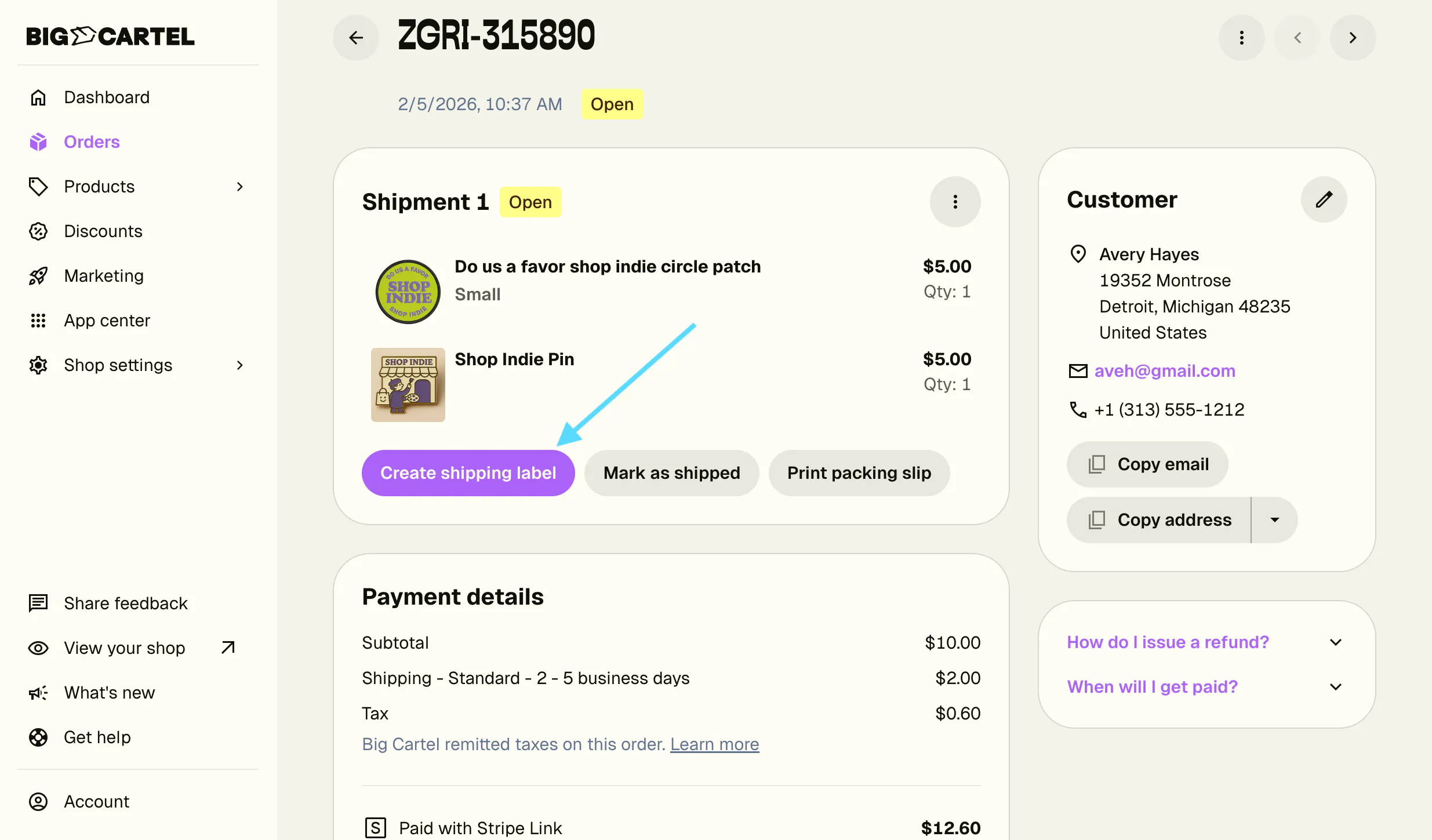
This is the easiest place to start when it is available in your country. You open an order, enter the package details, compare available carrier services, purchase the label, and print it from the order details page.
Why it may be a good fit
- Buy and print labels directly from a Big Cartel order.
- Access discounted Shippo rates in the U.S. and Canada.
- Use USPS, FedEx, DHL Express, Canada Post, or Royal Mail, depending on where you ship from.
- Create return labels and request eligible label refunds from the same workflow.
- For eligible U.S. sellers using Automatic Shipping Rates, show discounted rates at checkout.
Setup: Buy and print shipping labels from the Big Cartel admin
Good to know: Available to Platinum and Diamond sellers shipping from the U.S., Canada, or the U.K. You will connect a Shippo account and pay for the postage you purchase. The final label price can differ from the checkout amount if the package details or carrier service you choose after the sale are different from the information used at checkout.
2. Pirate Ship
Best for: U.S.-based sellers who want discounted USPS and UPS labels, batch processing, and no monthly shipping-software fee.
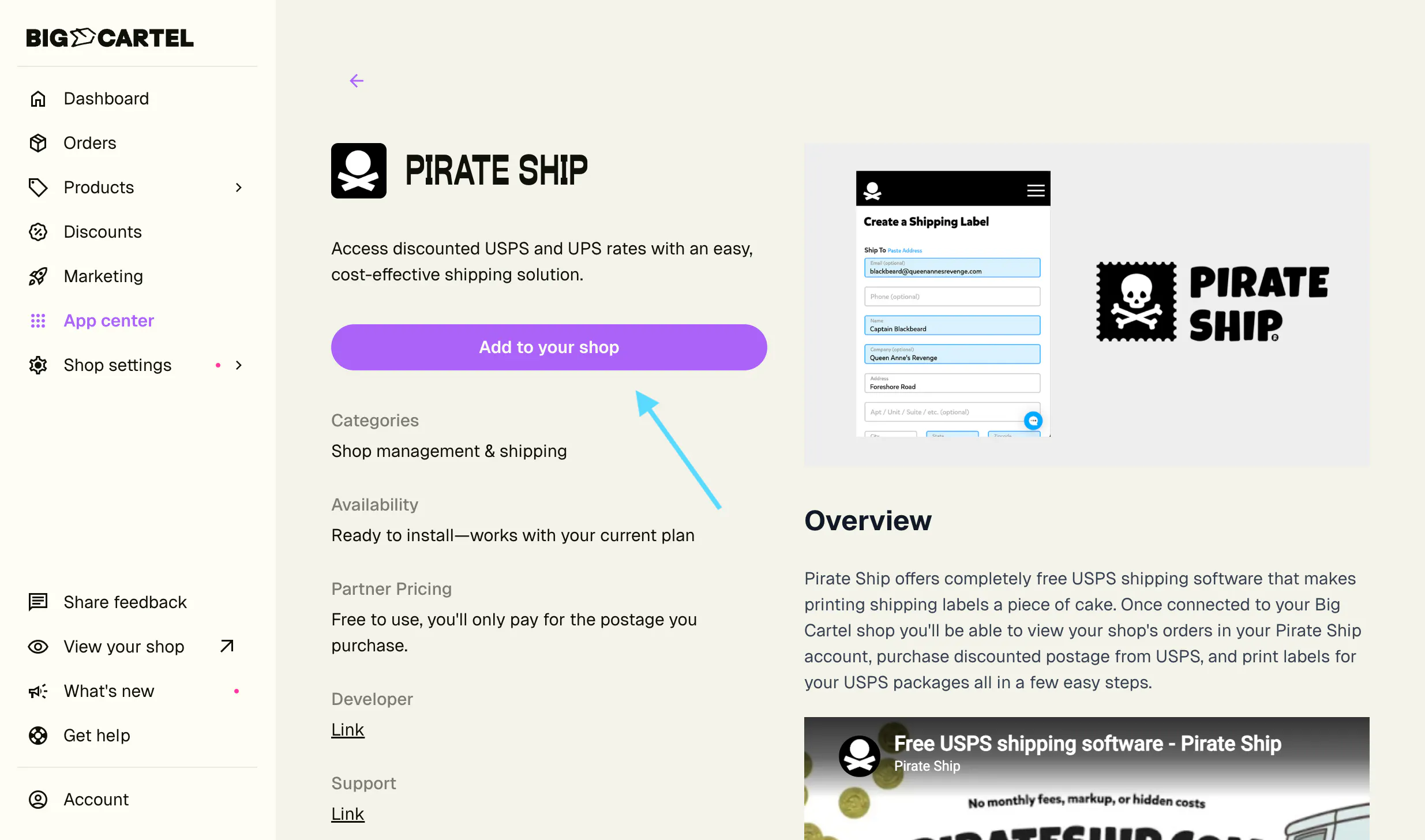
Pirate Ship is a strong step up when you want an external shipping workspace but still want the setup to stay simple. It imports eligible Big Cartel orders, lets you compare USPS and UPS services, and sends the tracking number and shipment status back after you buy the label.
Why it may be a good fit
- No monthly software fee or volume commitment.
- Import Big Cartel orders instead of copying customer addresses.
- Compare discounted USPS and UPS services.
- Save package presets and purchase labels in batches.
- Automatically update the Big Cartel order with tracking and shipment status.
Good to know: The Big Cartel integration requires a paid Big Cartel plan. Pirate Ship does not control or recalculate the shipping amount shown at Big Cartel checkout; set that amount through Automatic Shipping Rates or Shipping Profiles.
3. ShipStation
Best for: Growing sellers who manage orders from Big Cartel and other storefronts, want access to many carriers, or need shipping rules that reduce repetitive work.
ShipStation is built for a broader operation. Instead of treating Big Cartel as a separate shipping queue, you can bring orders from multiple sales channels into one workspace and apply shared fulfillment processes.
Why it may be a good fit
- Sync orders from Big Cartel and other connected stores or marketplaces.
- Create labels in batches and compare carrier services.
- Use automation rules to apply package, carrier, service, or workflow choices.
- Send tracking data and customer notifications automatically.
- Customize packing slips, emails, and tracking experiences on eligible plans.
- Ship from a browser or mobile app.
Good to know: ShipStation pricing and service availability vary by country, shipment volume, and plan. U.S. paid plans currently start at $14.99 per month and a trial is available. The Big Cartel connection requires a paid Big Cartel plan.
4. ShippyPro
Best for: Higher-volume or international sellers that need a wide carrier network, bulk label creation, centralized tracking, analytics, and advanced automation.
ShippyPro makes the most sense when shipping has become an operation of its own. It can bring Big Cartel orders into a larger fulfillment system, compare rates from your connected carriers, create labels in bulk, and update Big Cartel with tracking details.
Why it may be a good fit
- Connect Big Cartel alongside more than 80 other sales channels.
- Work with a network of more than 190 carriers.
- Compare rates from connected carrier accounts and print labels in bulk.
- Centralize tracking, customer notifications, shipping analytics, and workflow rules.
- Support more complex international and high-volume fulfillment processes.

5. ShipRush
Best for: Sellers who want side-by-side carrier rate shopping, bulk or cloud printing, and automation rules built around repeatable fulfillment decisions.
ShipRush is useful when choosing the best carrier service is a central part of every shipping day. Big Cartel orders can flow into ShipRush, where you can use negotiated or discounted carrier accounts, compare services, apply presets, and update order status after shipping.
Why it may be a good fit
- Import Big Cartel orders into one shipping workspace.
- Compare available carrier rates and services side by side.
- Use your own negotiated rates or supported discounted carrier programs.
- Bulk print labels, packing slips, and other shipping documents.
- Automate recurring choices such as package weight or shipping service.
- Update order and shipping status back to the connected store.
Good to know: ShipRush currently advertises a free Starter option, while paid services, carrier accounts, and add-ons can affect the total cost. Confirm the plan that supports your workflow before connecting it. The Big Cartel connection requires a paid Big Cartel plan.
Still deciding? Start with these questions
Do I want to keep fulfillment inside Big Cartel? If yes, and you ship from the U.S., Canada, or the U.K., start with Big Cartel Shipping Labels.
Am I a U.S. seller who mainly needs USPS or UPS labels? Pirate Ship gives you a simple external workflow without a monthly software fee.
Do I sell on more than one platform? ShipStation is usually the clearest next step for multichannel order management and automation.
Am I shipping at higher volume or across complex international carrier networks? ShippyPro is designed for a larger and more global operation.
Is comparing carrier rates and automating print workflows my biggest need? ShipRush puts rate shopping, presets, and bulk/cloud printing at the center.
Frequently asked questions
Do these tools decide what my customer pays for shipping?
Not by themselves. Big Cartel checkout uses Automatic Shipping Rates or Shipping Profiles. The third-party tools help after the order is placed. The connected exception is the eligible U.S. Automatic Shipping Rates + Big Cartel Shipping Labels workflow.
Can I use Pirate Ship even though Big Cartel has built-in labels?
Yes. Choose based on the workflow you prefer. Big Cartel Shipping Labels keep you inside the order page; Pirate Ship gives U.S. sellers a separate workspace with USPS and UPS rate comparison, presets, and batch labels.
Which options can work for sellers outside the U.S.?
Big Cartel Shipping Labels are available to eligible sellers shipping from Canada and the U.K. ShipStation, ShippyPro, and ShipRush also support international workflows, but account availability and carrier coverage depend on your country.
Do I need a paid Big Cartel plan?
Yes. Big Cartel Shipping Labels and the connected third-party shipping integrations in this guide are paid-plan features.
Can I change tools later?
Yes. Many sellers start with the simplest option and move to a multichannel or automated platform when order volume grows. To avoid duplicate shipment updates, use one primary fulfillment workflow for an order at a time.
Put your choice into action
Set your checkout rates. Choose Automatic Shipping Rates if you are an eligible U.S. seller, or create the rates your customers will see with Shipping Profiles.
Connect one primary shipping workflow. Follow the setup guide for the tool you chose and confirm that your Big Cartel orders appear where expected.
Test the full process. Use a real or test order to confirm the package details, label format, tracking writeback, shipment status, and customer notification.
Remember: Your first shipping setup does not have to be your forever setup. Start with what makes fulfilling today's orders easier, then add more automation only when it saves you time.
For U.S.-based sellers: Getting Started with Shipping on Big Cartel
For sellers outside the U.S.: Getting Started with Shipping on Big Cartel
Still need help choosing a shipping tool?
If you’re deciding between a few options, get in touch. We can help you narrow it down based on:
- Where you’re shipping from
- Which carriers you use
- Roughly how many orders you ship each month
- Whether you sell anywhere besides Big Cartel
- What you want to make easier, such as batch printing, rate shopping, international shipping, or automation
Your shipping setup can grow with your shop. For now, focus on the tool that makes fulfilling today’s orders easier.