What is Google Shopping?
Google Shopping is a built-in Big Cartel integration that connects your shop to Google Merchant Center, allowing your products to appear in Google Search and the Google Shopping tab.
Once connected, Google uses your product feed to display your listings to shoppers searching for related products online. This can help increase visibility, drive traffic to your shop, and generate more sales organically.

What Google Shopping can help you do
Google Shopping can help you:
- Show your products in Google Search and the Shopping tab
- Reach customers searching for products like yours
- Increase organic traffic to your shop
- Promote products through Google Ads campaigns
- Sync your Big Cartel product catalog to Google Merchant Center
- Manage product approvals and listing visibility from Google Merchant Center
- Expand your shop’s discoverability without needing a third-party integration service
Google Shopping pricing
The Google Shopping integration itself is included with paid Big Cartel plans at no additional cost.
However, some optional Google services may include additional fees:
- Google Shopping listings: Free organic listings
- Google Ads campaigns: Optional paid advertising managed through Google Ads
You can use the integration without running paid ads.
Big Cartel plan requirements
- Google Shopping is available on paid Big Cartel plans only.
What syncs between Big Cartel and Google Shopping?
When connected, Big Cartel automatically sends product data to Google Merchant Center, including:
- Product titles
- Product descriptions
- Product images
- Pricing
- Availability and stock status
- Product URLs
- Product variants
Your product feed is generated automatically through Big Cartel using a feed URL similar to:
https://yourshopname.bigcartel.com/google.xml
What doesn’t sync?
Some information still needs to be managed directly in Google Merchant Center, including:
- Shipping settings
- Return policies
- Tax settings
- Advanced product attributes like GTIN, MPN, or brand details
- Product edits made directly inside Google Merchant Center
- Unsupported countries or regional feed settings
Google may also require additional manual product edits or approvals before products appear publicly.
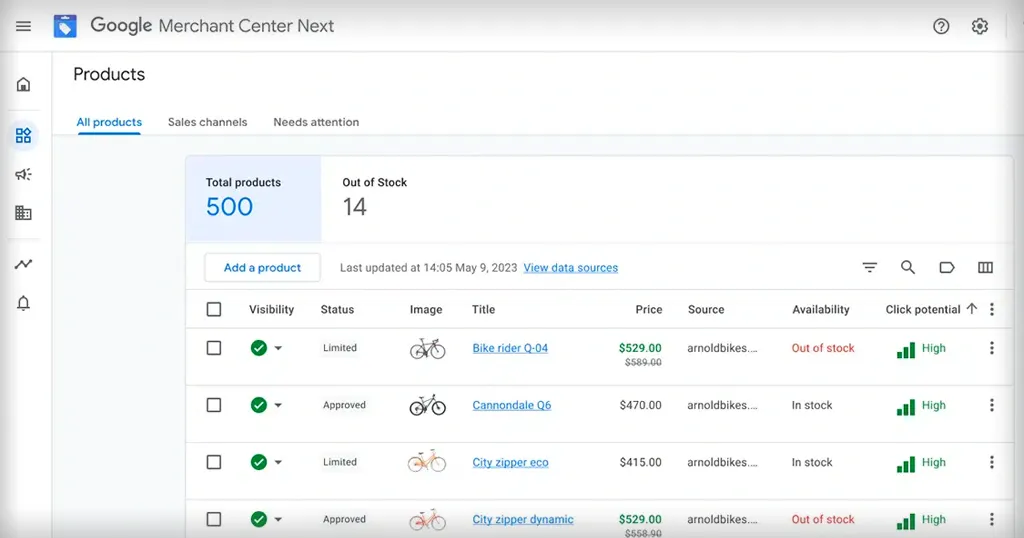
Key features
Product feed generation
Big Cartel automatically creates and maintains your Google product feed.
Google Merchant Center connection
Connect your store directly to Google Merchant Center through the Big Cartel App Center.
Organic Google Shopping visibility
Products can appear in Google Search results and the Shopping tab.
Product diagnostics and approvals
Use Google Merchant Center diagnostics tools to review warnings, errors, and product approval issues.
Google Ads compatibility
Run optional Google Ads campaigns using your synced product catalog.
Easy integration management
Manage your connection directly from your Big Cartel admin.
Common use cases
Promote products through Google Search
Many sellers use Google Shopping to help customers discover products organically through search results.
Increase traffic to a new shop
Google Shopping can help newer shops gain visibility faster by surfacing products directly in search results.
Run Google Ads campaigns
Sellers can connect their product catalog to Google Ads for paid shopping campaigns.
Improve product discoverability
Google Shopping helps customers find products by keywords, categories, images, and shopping intent.
Manage product issues centrally
Use Merchant Center diagnostics to monitor product approvals, feed issues, and listing visibility.
FAQs
How long does product approval take?
Product approvals typically take around 3–5 business days, though some products may require additional review or edits before approval.
Why aren’t my products showing on Google?
Common reasons include:
- Your shop is in maintenance mode
- Products are out of stock
- Products are inactive
- Missing refund or shipping policies
- Product disapprovals in Google Merchant Center
- Missing product information
Do I need Google Ads to use Google Shopping?
No. Free organic listings are available through Google Shopping without running ads.
Can Gold plan sellers use Google Shopping?
Gold sellers can access information about the integration, but a paid Big Cartel plan is required to connect and use it fully.
Can I disconnect Google Shopping later?
Yes. Disconnecting revokes Big Cartel’s access to your Google account and disconnects your product feed, but it does not delete your Google Merchant Center account.
Where do I manage shipping and return policies?
Shipping, return policies, and business information are managed directly in Google Merchant Center.
Need help?
If you’re running into issues with setup, approvals, or syncing:
- Review your Google Merchant Center → Diagnostics section for specific warnings or errors
- Make sure your shop is live and your payment processor is connected
- Ensure your return policy and shipping settings match your website exactly
You can also contact support directly: