When you make a sale through your Big Cartel shop, you may notice fees associated with the payment. These are payment processing fees charged by the payment processors that handle the transaction.
It’s important to know that Big Cartel does not charge transaction fees on your orders. Any processing fees are charged directly by your connected payment processor.
Currently, Big Cartel supports two payment processors:
- Stripe
- PayPal
Each processor sets its own fees, which may vary by country and payment method.
How Payment Processing Fees Work
When a customer places an order:
- The payment is processed directly through Stripe or PayPal.
- The processor deducts its processing fee.
- The remaining funds are added to your processor balance.
- The funds are then paid out to your bank account based on your payout schedule.
Big Cartel does not hold your funds and does not deduct processing fees.
Payment Processing Fees by Country
Because these fees can vary based on location and account configuration, it’s always best to confirm current pricing directly with your processor.
Stripe pricing details:https://stripe.com/pricing
PayPal pricing details:https://www.paypal.com/business/paypal-business-fees
Payment processors charge different rates depending on the country where your account is registered.
Below are common examples for U.S. and U.K. accounts. These rates are set by Stripe and PayPal and may change.
United States
Processor | Typical Fee | Notes |
|---|---|---|
Stripe | 2.9% + $0.30 per successful card payment | Applies to most online card payments |
PayPal | 3.49% + $0.49 per transaction | Standard PayPal Checkout rate |
Additional fees may apply for international payments or currency conversion.
United Kingdom
Processor | Typical Fee | Notes |
|---|---|---|
Stripe (UK cards) | 1.5% + £0.20 | Domestic UK cards |
Stripe (European cards) | 2.5% + £0.20 | Cards issued within Europe |
Stripe (International cards) | 3.25% + £0.20 | Cards issued outside Europe |
PayPal | 2.9% + £0.30 | Standard PayPal Checkout rate |
Payment Method Fees
The type of payment your customer uses can also affect the processing fee.
For example:
Standard card payments
- Credit cards
- Debit cards
- Apple Pay
- Google Pay
These usually follow the standard processing fee for your country.
Buy Now, Pay Later options
Options like:
- Afterpay / Clearpay
- Affirm
- Klarna
often have higher processing fees because they involve installment financing and additional risk management.
If you enable one of these payment methods through Stripe, the fees will be determined directly by Stripe.
Where to View Processing Fees
Processing fees are not shown in your Big Cartel admin.
To view them, you’ll need to open the transaction inside your payment processor dashboard.
View Stripe fees

- Go to your Orders tab in your Big Cartel admin.
- Click on the order.
- Scroll to the Payment section.
- Click View in Stripe.
This will open the transaction inside your Stripe dashboard, where you’ll see the processing fee listed in the payment breakdown.
Stripe labels this as: Stripe processing fee
View PayPal fees
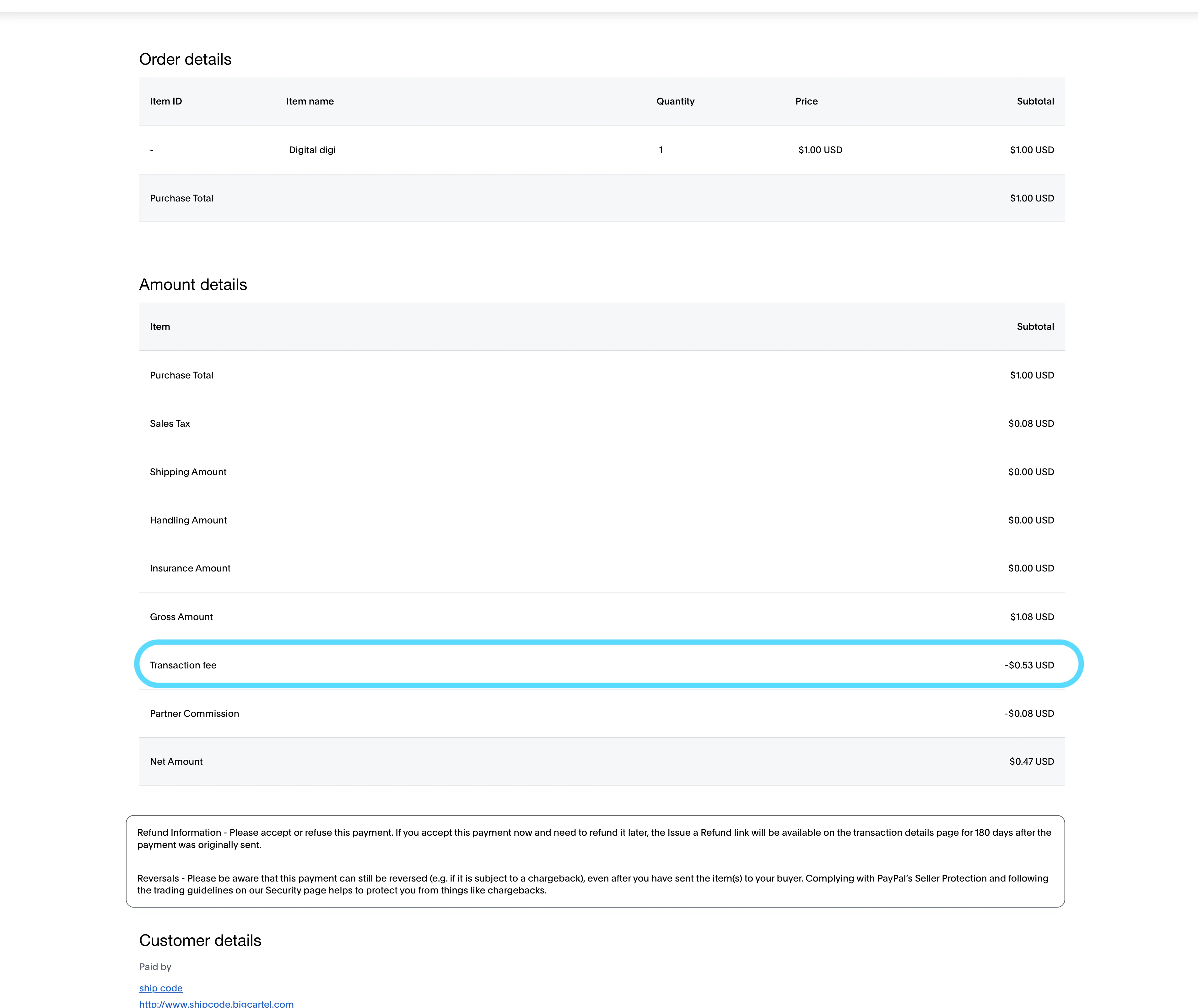
- Go to your Orders tab in your Big Cartel admin.
- Click on the order.
- Scroll to the Payment section.
- Click View in PayPal.
This opens the transaction in your PayPal dashboard, where the fee appears as: Transaction Fee
U.S. Sales Tax and Processor Fees
For U.S.-based orders, Big Cartel is responsible for collecting and remitting applicable sales tax in certain states.
When this happens, the tax amount may appear inside your processor dashboard alongside transaction details.
In these cases:
PayPal
You may see a line item labeled: Partner Commission
This represents the sales tax collected and remitted by Big Cartel.
Stripe
You may see a line item labeled: Application Fee
This represents the sales tax collected and remitted by Big Cartel.
This amount is not a processing fee, and it does not count as revenue for Big Cartel. It represents the tax that Big Cartel collects and remits where required by law.
Example: How Fees Affect a Sale
Keep this in mind when setting prices.
Example order total: $50.00
If the customer pays with a card using Stripe (U.S.):
- Order total: $50.00
- Stripe processing fee: $1.75 (2.9% + $0.30)
- Net added to your Stripe balance: $48.25
Stripe will then send payouts to your bank account based on your payout schedule.
Additional Fees to Be Aware Of
Depending on your payment processor settings, you may occasionally see additional fees such as:
- International card fees if you ship internationally
- Currency conversion fees
- Dispute or chargeback fees
- Refund processing fees
These are determined by Stripe or PayPal and will appear directly in their dashboards.